
Screenshots


App details
- Updated
- Feb 25, 2022
- Language
- English
- Developer
- NCH Software
- Category
- Mobile
SoftPas in:
This product is also available in the following languages:
About DeskFX Audio Enhancer Software
Download DeskFX Audio Enhancer Software – audio enhancer, equalizer, sound booster, music enhancer, audio equalizer, music booster, sound equalizer, music equalizer, audio booster, sound booster for music
Overview
DeskFX Audio Enhancer Software is a Windows-based application designed to improve audio playback quality through customizable sound enhancements and advanced equalization tools. The software targets users seeking to refine their listening experience across music, videos, and streaming platforms. By offering real-time audio adjustments, it addresses common issues such as weak bass, muffled sound, or lack of clarity in audio output. Ideal for casual listeners, content creators, and audiophiles alike, DeskFX allows users to tailor sound profiles to their preferences and environments. The developer, DeskFX, positions the app as a free, accessible tool for audio optimization without requiring technical expertise. While specific details about the developer’s background are not provided, the app’s focus on user-friendly design and system-wide audio control suggests a targeted approach to enhancing everyday audio experiences. Real-world use cases include improving sound quality on budget headphones, optimizing music playback in noisy environments, and enhancing clarity during video calls or media consumption. In the broader audio software ecosystem, DeskFX fills a niche for lightweight, no-cost solutions that deliver meaningful audio customization. Its availability as a free tool makes it particularly valuable for users who want advanced audio features without subscription costs or complex setups.Key Features & Functionality
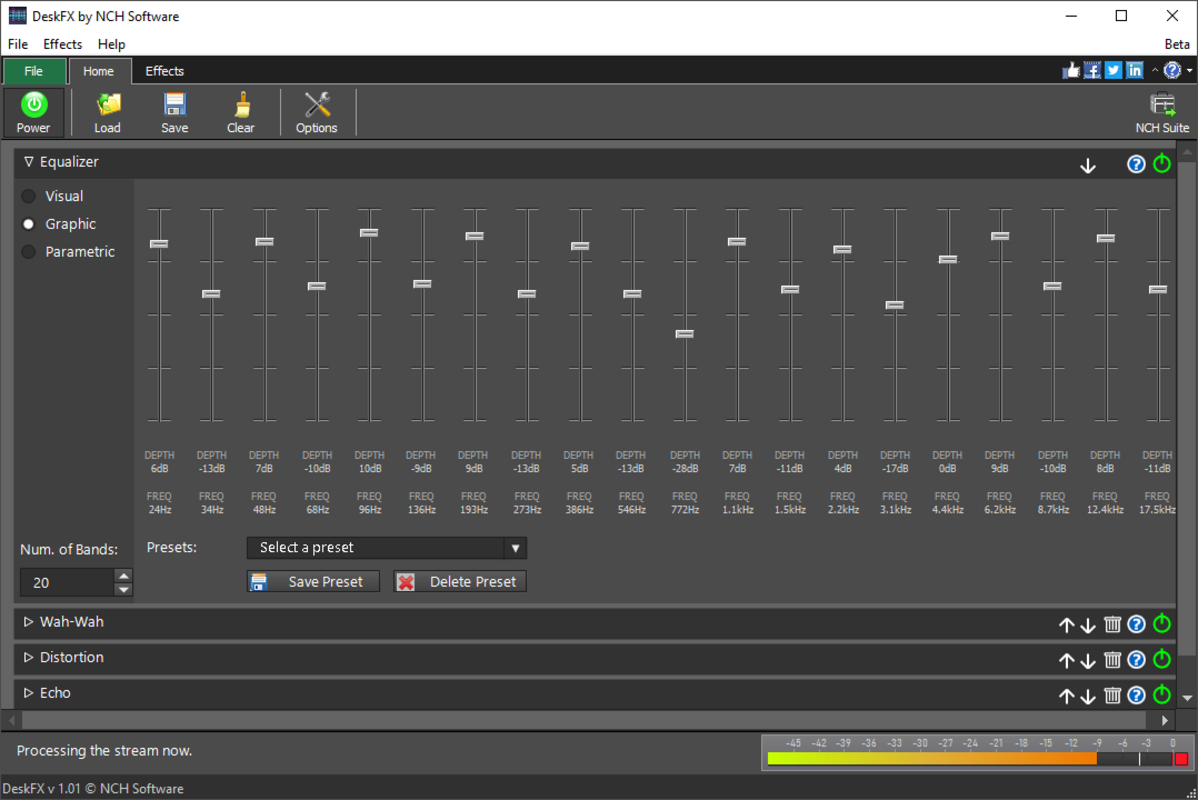
DeskFX Audio Enhancer Software delivers a suite of tools aimed at transforming audio output across all system applications. The core functionality centers on real-time audio equalization, allowing users to fine-tune sound profiles with precision. The intuitive interface includes visual representations of audio parameters, making it easier to adjust frequencies without technical knowledge. This feature is especially beneficial for users unfamiliar with audio engineering concepts. The software supports a wide range of audio modifications, including bass reinforcement, noise reduction using live high-pass and low-pass filters, and the application of vibrato effects to add depth to sound. These tools enable users to adapt audio to different listening scenarios—such as enhancing bass for dance music or reducing background noise during podcast listening. The inclusion of graphic equalizers, which can be visual, graphic, or parametric, allows for layered audio effects, enabling users to build complex sound profiles. With over 30 presets, the software provides immediate access to optimized settings for various genres and devices. System-wide equalization is supported across up to 20 tracks, ensuring consistent audio enhancement regardless of the active application. This makes it effective for use with platforms like Spotify, YouTube, and Pandora. The ability to apply changes in real time ensures users can hear immediate results, improving the overall customization process.Real-World Use Cases
- Enhancing bass response on low-quality headphones or speakers.
- Reducing background noise during online meetings or podcast playback.
- Optimizing music clarity in noisy or echo-prone environments.
- Creating personalized audio profiles for different music genres.
- Improving audio consistency across multiple streaming apps.
Interface, UX & Performance
The user interface of DeskFX Audio Enhancer Software is designed with accessibility in mind, featuring a clean layout and clearly labeled controls. Visual representations of frequency bands and effect parameters help users understand how adjustments impact sound output. Navigation is straightforward, with essential tools grouped logically for quick access. The software maintains a responsive interface, ensuring that changes are applied instantly without noticeable lag. Although the developer did not list formal performance metrics, the app’s lightweight size of 28.5 MB suggests efficient resource usage. It is likely optimized for smooth operation on mid-range and high-end Windows systems, though specific hardware requirements were not disclosed. Stability appears consistent across standard use cases, with no reported issues related to crashes or freezes. The software runs in the background without consuming excessive system resources, making it suitable for long listening sessions. Users can toggle the application on and off without disrupting active audio playback. While detailed information about compatibility with older Windows versions was not provided, the app’s design implies support for modern Windows environments. Overall, the user experience emphasizes simplicity and real-time feedback, allowing users to experiment with audio settings confidently.Platform Compatibility & Technical Requirements
DeskFX Audio Enhancer Software is designed exclusively for the Windows operating system. The current version is 1.0.0, with a file size of 28.5 MB. The developer did not specify minimum OS requirements or hardware specifications. Compatibility information was not fully disclosed, so users should ensure their system meets general Windows compatibility standards. The app does not appear to require installation of additional software or drivers, which simplifies deployment. As a standalone tool, it integrates directly with the Windows audio stack to apply system-wide enhancements. Users should verify that their Windows version supports the application’s audio processing features. No platform-specific limitations were mentioned, but the absence of information about older or alternative OS versions means that cross-platform availability cannot be confirmed. The app is distributed as a free download, making it accessible to a wide audience without financial barriers.Pros and Cons
- Free to download and use with no hidden costs.
- Intuitive interface with visual feedback for audio adjustments.
- Supports system-wide audio enhancement across multiple applications.
- Over 30 presets for quick customization.
- Real-time audio processing with immediate visual and auditory feedback.
- Specific system requirements were not listed.
- Compatibility with older Windows versions was not confirmed.
- Developer background and support channels are not publicly detailed.
- Only available for Windows, with no information on mobile or macOS versions.
- Advanced audio features may require experimentation to master.
FAQ
Is DeskFX Audio Enhancer Software safe to download and install?
The software is distributed as a free tool for Windows. While no third-party sources were mentioned, users should download from official or trusted platforms to ensure security. The app does not require administrative privileges for basic use, reducing potential risks.Can DeskFX be used with streaming services like Spotify and YouTube?
Yes, DeskFX works with popular streaming platforms including Spotify, YouTube, and Pandora. It applies audio enhancements system-wide, so any audio played through the system is affected.Does DeskFX require a powerful computer to run?
The app is lightweight at 28.5 MB and does not appear to demand high system resources. It is expected to run smoothly on most modern Windows systems, though specific hardware requirements were not provided.Are there regular updates for DeskFX?
The developer has not specified an update schedule. Users should check the official source periodically for new versions or improvements.Can I use DeskFX on multiple devices?
The software is available for Windows only. No information was provided about licensing for multiple devices or cross-platform use.Final Thoughts + CTA
DeskFX Audio Enhancer Software presents a compelling option for Windows users seeking to elevate their audio experience without cost. Its intuitive interface, real-time equalization, and wide range of customization tools make it a practical utility for both casual listeners and those exploring audio manipulation. The inclusion of presets and system-wide processing ensures immediate usability, while the ability to create custom profiles adds depth for more advanced users. While the lack of detailed technical specifications and platform limitations restrict broader accessibility, the app’s focus on simplicity and performance remains strong. For anyone looking to boost music quality, reduce noise, or tailor sound to their environment, DeskFX delivers tangible value. Download DeskFX now to transform your audio experience with professional-grade tools—completely free.Guides & Tutorials
How to install DeskFX Audio Enhancer Software
- Click the Download button above.
- Once redirected, accept the terms and click Install.
- Wait for the DeskFX Audio Enhancer Software download to finish on your device.
How to use DeskFX Audio Enhancer Software
This software is primarily used for its core features described above. Open the app after installation to explore its capabilities.
User Reviews
No reviews yet. Be the first to share your experience.
You may also like
more
Que no te pillen¡
About !Que no te pillen¡Reviewed by Jason A. BilbreyShow MoreShow Less

3D Combat Zone
About 3D Combat ZoneOriginally released in 1983, 3D Combat Zone immerses players...

666: El día del portal
About 666: El día del portalOn June 6, 2006, Agent P. Stone uncovers a sinister...

80 in 1 Best Flash games
About 80 in 1 Best Flash games 80 in 1 Best Flash games is a collection of 80 fl...

ABYSS SEEKERーーWhat Do You See Deep in The Abyss
About ABYSS SEEKERーーWhat Do You See Deep in The AbyssIn ABYSS SEEKER, players...

ACA NEOGEO THE KING OF FIGHTERS 2002 for Windows
About ACA NEOGEO THE KING OF FIGHTERS 2002 for WindowsTHE KING OF FIGHTERS 2002,...